How Apigee interprets a request path
Apigee conditions decide which flows, policies, and target endpoints handle a request. The operators look similar in a configuration file, but have different matching rules: Matches supports * as a wildcard, MatchesPath matches path segments, JavaRegex evaluates a regular expression, and == compares values directly.
That distinction becomes important when a proxy uses more than one operator for the same endpoint. A flow may accept a path that its validation code or route rule does not recognize. Semicolons, commas, and equals signs are useful examples of where those interpretations differ.
Path separators
Semicolons (;), commas (,), and equals signs (=) are reserved URL characters. RFC 3986 describes their use for parameters or subcomponents within a path segment; it does not require every application to interpret them identically.
For example, name;v=1.1 might refer to version 1.1 of “name,” while name,1.1 could express a similar idea. Whether either form has that meaning depends on the URI scheme and the application receiving the request.
For an API proxy, the relevant question is whether the value checked by a policy is the same value used to choose the route and the same path the backend receives. The following examples show where that assumption breaks down in Apigee.
What ExtractVariables returns
ExtractVariables provides a straightforward way to observe Apigee’s treatment of separators. This policy extracts the id segment from /a/{id} into apigee.id:
<?xml version="1.0" encoding="UTF-8" standalone="yes"?>
<ExtractVariables continueOnError="false" enabled="true" name="EV-1">
  <DisplayName>EV-1</DisplayName>
  <Properties/>
  <URIPath>
    <Pattern ignoreCase="true">/a/{id}</Pattern>
  </URIPath>
  <IgnoreUnresolvedVariables>true</IgnoreUnresolvedVariables>
  <Source clearPayload="false">request</Source>
  <VariablePrefix>apigee</VariablePrefix>
</ExtractVariables>
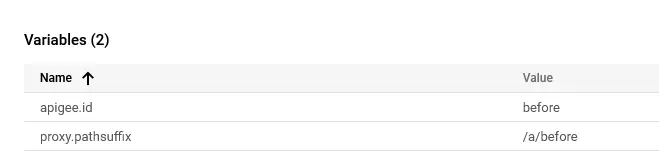
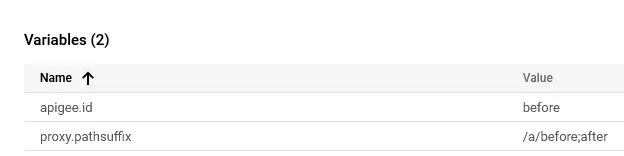
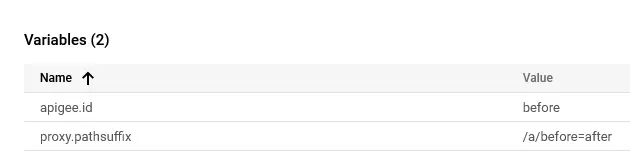
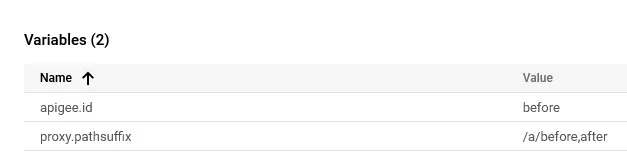
With the policy above, these four requests produced the following values:
/a/beforeextractedbefore.
 Article screenshot
/a/before;afteralso extractedbefore.
 Article screenshot
/a/before=afterextractedbefore.
 Article screenshot
/a/before,afterextractedbefore.
 Article screenshot
Every request produced before. ExtractVariables excluded the separator and the remainder of the segment, whether the separator was ;, =, or ,.
That is worth keeping in mind when validating an extracted identifier. Passing a check on apigee.id does not mean that the complete incoming path has passed the same check. The extra path data may still be present when the proxy forwards the request.
How MatchesPath compares paths
MatchesPath also works with path segments rather than simply comparing the path string. Its documented wildcard rules are:
... [MatchesPath] operator looks at a path as a series of parts. Therefore, if the path is:
/animals/cats/wildyou can think of the path as consisting of the parts:/animals,/cats, and/wild. The MatchesPath operator lets you use two wildcard notations: a single asterisk (*) and a double asterisk (**). The single asterisk matches one path element. The double asterisk matches one or many path elements...
For example, proxy.pathsuffix MatchesPath "/path/*" matches one segment after /path/:
<Flow name="/path/*">
  <Description/>
  <Request/>
  <Response/>
  <Condition>proxy.pathsuffix MatchesPath "/path/*"</Condition>
</Flow>
The condition accepts both of the following requests, although a literal interpretation of /path/ would distinguish them.
Request 1: /path/aaa
- Expected Result:
true - Actual Result:
true
There is no surprise here: aaa is one segment after /path/, so the condition returns true.
Request 2: /path;bbbb/aaa
- Expected Result:
false - Actual Result:
true
The second result is the important one. If the intention is to require the literal prefix /path/, this request should fail. MatchesPath instead disregards ;bbbb and returns true.
The request path can still contain ;bbbb when it reaches the target. Like ExtractVariables, the matching operator does not necessarily examine the path in the form the backend will use.
The following cases came from assessments of production proxies. Each combined path checks that looked consistent in the configuration but accepted different requests.
Example 1: The flow matches, but the route rule does not
In one proxy, the Flow used MatchesPath for /recommendations, while the RouteRule used strict equality (==) for the same path:
<Flow name="fetchRecommendations">
    <Condition>proxy.pathsuffix MatchesPath "/recommendations"</Condition>
</Flow>
...
<RouteRule name="DigitalLayer">
    <TargetEndpoint>DigitalLayer</TargetEndpoint>
    <Condition>proxy.pathsuffix == "/recommendations"</Condition>
</RouteRule>
<RouteRule name="k8smicroservice">
    <TargetEndpoint>k8smicroservice</TargetEndpoint>
</RouteRule>
A request to /recommendations selected the flow and went to DigitalLayer, as intended. With /recommendations;other-info, the flow condition still matched, but the route rule did not. Apigee therefore used the unconditional fallback route to k8smicroservice. That backend accepted /* paths, and in this case the request exposed another user’s data.
Example 2: Access control checks a narrower path
Another proxy enforced access restrictions in a JavaScript function called from PreFlow. The function used regular expressions to block user access to certain paths. Later in the request flow, MatchesPath selected the corresponding endpoint:
<PreFlow name="PreFlow">
    <Request>
        ...
        <Step>JavaScript.validateAuthentication</Step>
        ...
    </Request>
</PreFlow>
...
<Flows>
    <Flow name="adultContentLock">
        ...
        <Condition>proxy.pathsuffix MatchesPath "/adult-content-lock"</Condition>
    </Flow>
    ...
</Flows>
The JavaScript function checked the caller’s context and the literal path:
function validateAuthentication () {
  var pathSuffix = context.getVariable("proxy.pathsuffix");
  var accessContext = context.getVariable("accesstoken.context"); // get context to determine if user or system calling our endpoint
  var blockRegexArray = [
    new RegExp("^/adult-content-lock$"),
    new RegExp("^/contracts$"),
    "..."
  ];
  if (accessContext === "USER") { // if user calling
    for (i = 0; i < blockRegexArray.length; i++) {
      // we match with each regex to determine if path should not be accessed by user
      var match = blockRegexArray[i].test(pathSuffix);
      if (match) {
        // throw an error and stop flow execution
        throw new Error("Access denied");
      }
    }
  }
}
When accessContext was USER, the function tested pathSuffix against the patterns in blockRegexArray. A match raised Access denied and stopped the request. Because the patterns ended with $, they required an exact path.
For /adult-content-lock;extra, those regular expressions did not match, so the check did not deny access. The flow’s MatchesPath condition did match. The result was an access-control check and a flow condition that disagreed about whether the request addressed the restricted resource.
Example 3: Input validation is skipped
The same mismatch affected input validation in another proxy. A PreFlow JavaScript policy validated the account-number header for GET requests to two exact paths:
var path = context.getVariable("proxy.pathsuffix");
if ((path === "/available-offers" || path === "/current-offers") && requestVerb === "GET") {
  var accountNumberRegex = new RegExp(/^10\d{8,10}$/);
  var accountNumber = context.getVariable("request.header.x-account-number");

  if (!accountNumberRegex.test(accountNumber)) {
    throw new Error("Invalid account number");
  }
}
The flow conditions, however, used MatchesPath for those endpoints:
<PreFlow name="PreFlow">
    <Request>
        ...
        <Step>JavaScript.ValidateRequestParameters</Step>
        ...
    </Request>
</PreFlow>
...
<Flows>
    <Flow name="getCurrentOffers">
        ...
        <Condition>proxy.pathsuffix MatchesPath "/current-offers" and request.verb == "GET"</Condition>
    </Flow>
    ...
</Flows>
A separator suffix prevented the JavaScript equality check from matching, while the flow still accepted the request. The backend therefore received requests that had skipped the account-number validation intended for that endpoint.
Example 4: AWS interprets the forwarded path differently
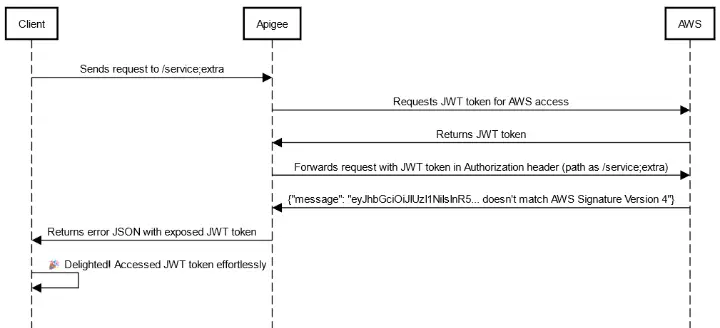
A proxy with an AWS-hosted target forwarded the request path to the backend. Apigee matched /service;extra as /service, but AWS handled it through a default handler instead.
The proxy’s Authorization header contained a JWT. The AWS handler expected AWS Signature Version 4 and returned a JSON error containing that JWT. The mismatch thus exposed a token that, in this configuration, allowed the client to access AWS services without going through Apigee.
 Article screenshot
Choosing consistent path checks
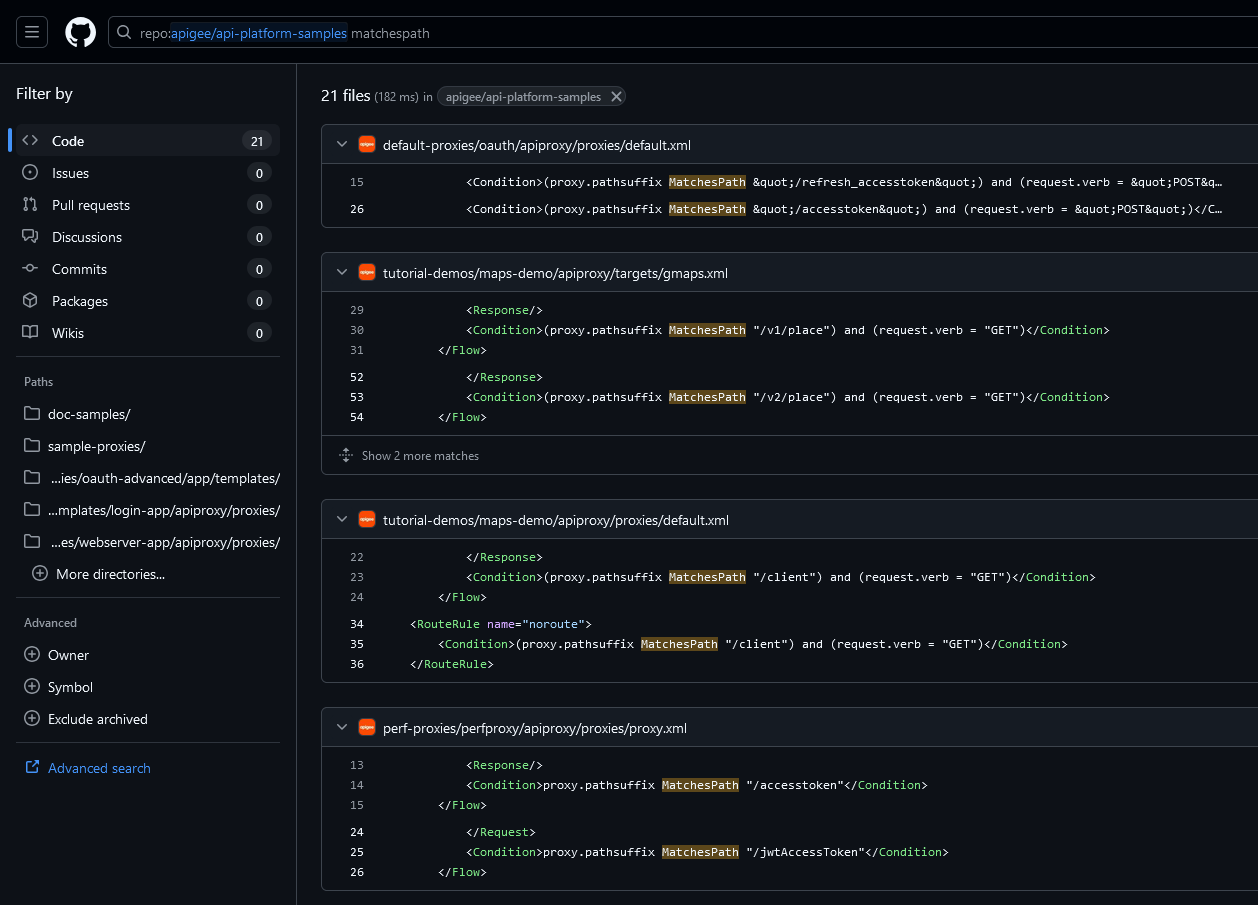
These cases do not make MatchesPath an unsuitable operator for every flow. They show why it should not be treated as an exact comparison, particularly when another policy makes a security decision using the literal path. This pattern came up frequently in my assessments; Apigee’s own examples also use MatchesPath for static conditions.
 Article screenshot
MatchesPath usage in the Apigee samples
When reviewing a proxy, compare the paths accepted by its access checks, validation policies, flow conditions, and route rules. A condition that looks like a static path may still accept parameter suffixes.
Match static paths precisely
For a static endpoint, prefer strict equality (==). If the endpoint needs pattern matching, use a regular expression that describes the paths you actually intend to accept, and apply that interpretation consistently to the associated checks.
Test the complete route
Check the complete route in a non-production environment: which validation runs, which flow and route rule match, and what path reaches the backend. Comparing those results is more useful than testing each condition in isolation.
Select text to leave a comment.