Request values and target URLs
Dynamic target URLs are common in Apigee: a proxy reads a request value and uses it to select a backend resource. A username might become a query parameter, or a subscription type might become part of a path. The problem starts when the proxy treats that value as ordinary text while the URL parser treats parts of it as syntax.
There is another complication in Apigee: assigning target.url can evaluate the string as a message template. The examples below show query-parameter injection, path traversal, and disclosure of a flow variable through that evaluation. Other consequences, including Server-Side Request Forgery (SSRF) and Denial of Service (DoS), are also possible when target URLs contain unchecked request data.
Constructing a target URL from request data
JavaScript is one way to construct a target URL dynamically. Values can be read during the proxy request flow and reused when the target request is built.
This Apigee documentation example takes that approach:
if (context.flow == "PROXY_REQ_FLOW") {
    var username = context.getVariable("request.formparam.user");
    context.setVariable("info.username", username);
}

if (context.flow == "TARGET_REQ_FLOW") {
    context.setVariable("request.verb", "GET");
    var name = context.getVariable("info.username");
    var url = "http://mocktarget.apigee.net/";
    context.setVariable("target.url", url + "?user=" + name);
    context.setVariable("request.content", "");
}
The script reads the form parameter user into info.username. In the target request flow, it switches the request to GET and appends that value to http://mocktarget.apigee.net/?user=. The concatenation does not distinguish between a username and characters that have meaning in a query string.
Additional query parameters
An ampersand in the supplied value can become a parameter separator in the target URL. This is HTTP Parameter Pollution: data submitted as one parameter changes the set of parameters received by the backend.
For example, this form submission sends John&new_param=new_value as the value of user:
curl -X POST \
'https://your-apigee-endpoint.com/target_url' \
--header 'Accept: */*' \
--header 'Content-Type: application/x-www-form-urlencoded' \
--data-urlencode 'user=John&new_param=new_value'
The proxy appends that value without encoding it for the query string. The resulting target URL is http://mocktarget.apigee.net/?user=John&new_param=new_value:
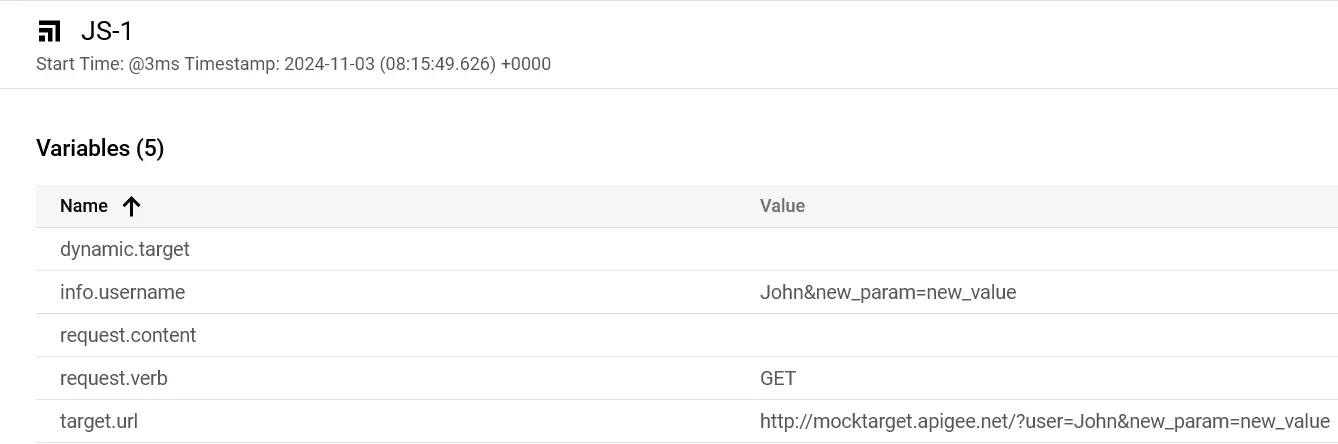 Screenshot
The backend now receives new_param=new_value as a separate parameter. Although the form submission encoded the value, that did not protect the URL assembled later by the proxy.
The same issue can affect a path rather than a query string.
Putting a header value into the target path
During an assessment, I came across a proxy that used ExtractVariables to read a custom header, then AssignMessage to insert it into the backend path. The Apigee documentation describes AssignMessage as another way to override the target URL; using a policy instead of JavaScript does not remove the need to validate the value.
The extraction policy read X-Subscription-Type:
<ExtractVariables name="Extract-SubscriptionType">
    <Source>request</Source>
    <Header name="X-Subscription-Type">
        <Pattern>{subscriptionType}</Pattern>
    </Header>
    <VariablePrefix>flow</VariablePrefix>
</ExtractVariables>
It stored the header value in flow.subscriptionType, which AssignMessage used to build the URL:
<AssignMessage name="Set-TargetURL">
    <AssignVariable>
        <Name>target.url</Name>
        <Template>https://backend.example.com/billing/v2/{flow.subscriptionType}/data</Template>
    </AssignVariable>
</AssignMessage>
The application expected payg or paym to select the appropriate billing resource. Nothing in these policies, however, restricted the header to those two values.
The expected subscription type
For the expected pay-as-you-go subscription, the header is:
X-Subscription-Type: payg
ExtractVariables stores payg in flow.subscriptionType, and AssignMessage produces:
https://backend.example.com/billing/v2/payg/data
This is the intended billing resource.
A value that changes the path
The following header value changes the path instead of selecting a subscription type:
X-Subscription-Type: ../../internal/v1/call#
The same extraction and assignment produce:
https://backend.example.com/billing/v2/../../internal/v1/call#/data
When Apigee resolves the URL, ../../ moves up two path levels. The fragment marker # excludes the trailing /data from the request path, leaving:
https://backend.example.com/internal/v1/call
The request therefore reaches /internal/v1/call, not /billing/v2/payg/data. In this setup, the unchecked header gave access to an internal resource outside the intended billing route.
 Screenshot
The URI shown in Apigee Debug confirmed which resource received the request.
When the URL is evaluated as a template
URL syntax is not the only concern. A value can pass through a message template more than once.
In the behavior observed during this assessment, Apigee evaluated a newly assigned target.url as a message template. This occurred whether the URL was constructed with AssignMessage or JavaScript. Placeholders carried in request data could therefore be resolved as flow variables.
The AssignMessage template illustrates the two stages:
<AssignVariable>
    <Name>target.url</Name>
    <Template>https://backend.example.com/billing/v2/{flow.subscriptionType}/data</Template>
</AssignVariable>
First, the <Template> element resolves its variables. Then, assigning the resulting string to target.url evaluates any placeholders still present in that string. target.url.temp below is a name for the intermediate value, used to explain the sequence.
First evaluation: the AssignMessage template
- The
<Template>element resolves variables enclosed in{}. - With
flow.subscriptionTypeset topayg, the result ishttps://backend.example.com/billing/v2/payg/data. - Call this intermediate string
target.url.temp.
Second evaluation: assignment to target.url
- Assignment to
target.urlevaluatestarget.url.tempas a message template again. - Any placeholders remaining in the intermediate string are resolved in this second evaluation.
- A placeholder such as
{flow_variable}can therefore be replaced with the corresponding flow-variable value.
For example, the supplied subscription type could itself contain a placeholder:
X-Subscription-Type: {private.client_secret}
The first evaluation produces https://backend.example.com/billing/v2/{private.client_secret}/data. During assignment, the second evaluation replaces {private.client_secret} with its value, giving:
[https://backend.example.com/billing/v2/AY62KADL37yAgd981q/data](https://backend.example.com/billing/v2/AY62KADL37yAgd981q/data)
The secret is now in the URL sent to the backend, even though the proxy never explicitly included it in the original template.
 Screenshot
Apigee Debug showed the substituted value in the target URL.
If the backend includes the invalid subscription type in an error response, the disclosure also reaches the client:
{"error": "AY62KADL37yAgd981q is not a valid subscription type"}That response exposes the client secret used for backend communication. The two evaluations are important here: checking only the variables written directly into the AssignMessage template would miss the placeholder supplied through the header.
Validation and encoding
Validation and encoding address different parts of the problem. Validation determines whether a value is acceptable to the application; encoding prevents an accepted value from becoming URL syntax. Both belong before the value is used to construct the target URL.
Validate permitted values
When a value selects from a small set of resources, check that set explicitly. The subscription-type example expects two values, so it does not need to accept arbitrary path text.
Use an allowlist
An allowlist for payg and paym can reject anything else before the URL is built:
var subscriptionType = context.getVariable('flow.subscriptionType');
var validTypes = ['payg', 'paym'];

if (validTypes.indexOf(subscriptionType) == -1) {
    // Reject the request with an error
    throw new Error('Invalid subscription type');
} else {
    // Proceed with the valid input
}
Validate a defined format
For values with a defined format, validate that format instead. This example checks a UUID with a regular expression:
<Step>
    <Name>ExtractVariables.UserID</Name>
</Step>
<Step>
    <Name>RaiseFault.InvalidUserID</Name>
    <Condition>!(flow.userId JavaRegex ^[0-9A-Fa-f]{8}-[0-9A-Fa-f]{4}-4[0-9A-Fa-f]{3}-[89AB][0-9A-Fa-f]{3}-[0-9A-Fa-f]{12}$)</Condition>
</Step>
Encode URL components
Once a value has passed validation, encode it for the URL component where it will be used.
For a path segment, the JavaScript example uses encodeURIComponent():
var subscriptionType = context.getVariable('flow.subscriptionType');
var encodedSubscriptionType = encodeURIComponent(subscriptionType);
var targetUrl = 'https://backend.example.com/billing/v2/' + encodedSubscriptionType + '/data';
context.setVariable('target.url', targetUrl);
Review target URL construction
When reviewing a proxy, trace the request value through extraction, validation, URL construction, and assignment. Check whether the resulting string is evaluated again by a policy or flow-variable assignment. That sequence matters just as much as the policy that first reads the value.
Select text to leave a comment.